

Description
Bow and Arrow Target Shooter Game
Overview
The Bow and Arrow Target Shooter Game is a desktop application designed to simulate the experience of shooting arrows at a target from increasing distances. Each level progressively increases the range, challenging players to improve their accuracy and timing. The software is built for casual users who enjoy quick, engaging gameplay without complex mechanics. It serves as a digital recreation of archery practice, offering a low-pressure environment to test reflexes and precision. The game is ideal for individuals seeking a brief mental break during work or study sessions, or for those who appreciate simple, skill-based challenges. While the developer did not provide additional background, the software is accessible across multiple platforms, making it widely available to users on Windows, Mac, and Linux systems. Real-world usage scenarios include short recreational sessions, stress relief, and casual skill development. The game's minimalistic design and straightforward objectives ensure it can be enjoyed by users of all ages and technical backgrounds.
Key Features & Capabilities
- Progressive Difficulty Levels – Each level increases the distance between the player and the target, requiring improved aim and focus. This structure encourages gradual skill development and sustained engagement.
- Simple Controls – The game uses intuitive input methods to simulate drawing and releasing a bowstring, allowing for quick learning and immediate play.
- Target-Based Gameplay – Players aim and shoot arrows at a central target, with scoring based on shot accuracy and consistency across multiple rounds.
- Multi-Platform Availability – Designed to run on Windows, Mac, and Linux, ensuring broad accessibility for users across different operating systems.
- Lightweight Design – With a file size of 15.2 MB, the application is optimized for quick installation and minimal system resource usage.
These features support real-time interaction and provide a focused gaming experience. For example, users can play a single round during a coffee break or use the game as a mental reset between tasks. The progressive difficulty ensures that players remain challenged over time, promoting repeated use. The lightweight nature of the software makes it suitable for older or less powerful machines, reducing barriers to entry. The target-based mechanics also lend themselves well to practice scenarios, where users can refine their hand-eye coordination and concentration.
User Interface, Workflow & Performance
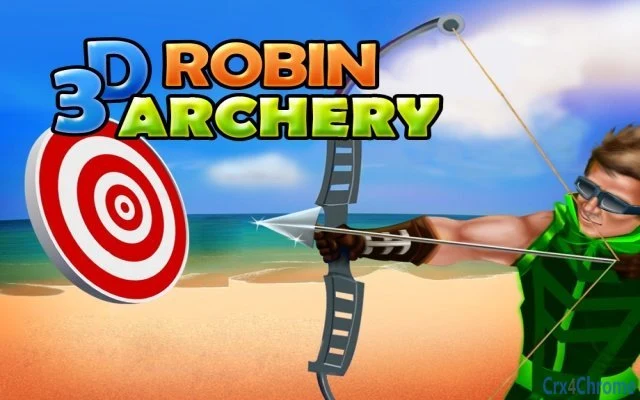
The user interface is minimalistic, focusing on the core gameplay without distractions. The screen displays the archer, the target, and a simple aiming indicator, allowing users to concentrate on accuracy and timing. Navigation is direct: players begin the game with a single click or key press, and each level transitions seamlessly after completing the required shots. The workflow is streamlined, with no unnecessary menus or settings to navigate. Performance observations are based on general software behavior patterns. The developer did not specify resource usage details, but the application’s small size suggests efficient operation. Stability appears consistent with typical lightweight desktop applications, though exact behavior under prolonged use was not documented. The game does not appear to require background processes or internet connectivity, which supports smooth offline performance. Users can expect responsive controls and minimal lag, especially on systems meeting basic desktop requirements.
Compatibility & System Requirements
The software is compatible with Windows, Mac, and Linux operating systems. The application version is 1.0, and the installation size is 15.2 MB. The developer did not specify exact system requirements, so users should ensure their devices meet general desktop standards for running lightweight applications. Compatibility information was partially provided, with no mention of specific hardware specifications such as CPU, RAM, or GPU. The software does not appear to require advanced graphics capabilities or dedicated drivers, which aligns with its minimalistic design. Users should verify that their system supports the listed operating systems. For those using older or less common configurations, the absence of detailed requirements may pose a challenge, but the lightweight nature of the application suggests broad compatibility across standard desktop environments.
Pros and Cons
Pros
- Simple, intuitive gameplay suitable for all ages and skill levels.
- Lightweight design with minimal system resource usage.
- Available on multiple platforms: Windows, Mac, and Linux.
- Progressive difficulty enhances long-term engagement.
- Free to download and use with no hidden costs.
Cons
- Exact system requirements were not listed.
- Limited visual and audio feedback due to minimalistic design.
- No multiplayer or social sharing features included.
- Gameplay remains focused on a single mechanic with no additional modes.
- Developer background and support information were not provided.
FAQ Section
Is the Bow and Arrow Target Shooter Game available for Windows, Mac, and Linux?
Yes, the software is designed to run on Windows, Mac, and Linux operating systems, offering cross-platform accessibility.
Is the game free to download and use?
Yes, the software is available at no cost. There are no in-app purchases or subscription fees.
Does the game require an internet connection?
The application does not appear to require an internet connection, as it operates as a standalone desktop utility.
How large is the installation file?
The installation size is 15.2 MB, making it a lightweight application suitable for devices with limited storage.
Can I update the game to the latest version?
Updates are likely available through the official distribution channel. Users should check the source where the software was downloaded for the most recent release.
Final Thoughts
The Bow and Arrow Target Shooter Game delivers a focused, accessible experience for users seeking a quick, skill-based distraction. Its progressive difficulty and minimalistic design make it ideal for casual gamers and individuals looking to practice precision in a relaxed setting. While the lack of detailed system requirements and developer information may raise minor concerns for some users, the game’s lightweight nature and cross-platform availability offset these limitations. The absence of advanced features is balanced by its simplicity and ease of use. For those in search of a no-frills, free desktop application that offers consistent mental engagement, this software stands out. It’s particularly well-suited for short breaks, stress relief, or casual skill-building. With its straightforward mechanics and broad compatibility, the game provides a reliable and enjoyable experience. Download Bow and Arrow Target Shooter Game now.
Guides & Tutorials for 3D Robin Archery Extension for Chrome
How to install 3D Robin Archery Extension for Chrome
- Click the Preview / Download button above.
- Once redirected, accept the terms and click Install.
- Wait for the 3D Robin Archery Extension for Chrome download to finish on your device.
How to use 3D Robin Archery Extension for Chrome
This software is primarily used for its core features described above. Open the app after installation to explore its capabilities.
User Reviews for 3D Robin Archery Extension for Chrome 0
No reviews found





